Monday, November 1, 2010

Unable to engage module rampart

If you have ever tried to create an axis web service with security, you probably have see this error:
AxisFault: unable to engage module "rampart" 
When I encountered this problem, I was working with eclipse having axis2 plug-ins. I found a solution in WSAS Forum.

Wonderful thing to note is, I got this error fixed and while reading the forums of wso2 wsas, I got this link and I thought it would be good to share this.

Note: This post is applicable to those who are not using axis2 repositories for development and using standalone eclipse projects. I was using the same.

Tuesday, August 17, 2010

How to create a signle package for skin and container

In last week I've released a new skin Multiflex5 on OSDNNSKINS, which is having two packages in downloads section, one for skin and another for containers. When I visited the download page to make sure downloads are working fine, I noticed that skin package is having more downloads than container package's download. This is why this question comes to my head.

The Idea behind creating a single package is to make sure newbies can also install the package correctly, and when they evaluate the skin. So, I have decided to add two things:

1. Create single package for skin and containers.

2. Create a page template (or may be portal template not sure) that can be used to see the demo.

So, right now I'm going to discuss about how I have created a single package for skin and container. and you have to wait for next post to know how to create page template that can demonstrate the skin.

Before starting to manually do the following steps, I've tried finding if there is an automated way to do this, and already created a question in dnn skinning forum. Following are manual steps to merge two different skin and container packages to single one.

1. Create separate packages for skin and containers using Create Package Wizard.
2. Copy the packages from dnn's Install folder to a new folder.
3. Create a New folder called Package and paste all files of skins and containers to a package folder.
4. Make sure you don't have common name for any file in skin/container's package. Otherwise step 3 will overwrite it.
5. Open container's .dnn file and copy following section:
<package name="Multiflex5.4" type="Container" version="0.0.4">
...
</package>
6. Open .dnn file for skin and paste the it before </packages> tag.
7. Remove .dnn file for container
9. Press Cnrl + A to select all files, right click > Send To > Compressed (Zipped) folder
10. Rename the newly created Zip file to your desired name.
11. Test it by installing it to new instance of DNN (or change the skin and container names to install it to the existing installation)

Hope this will be helpful.

Saturday, August 14, 2010

Free DNN Skin - Multiflex5 Enhancements - Part - 1: Formating DNN's default module warnings and errors at client side using jQuery

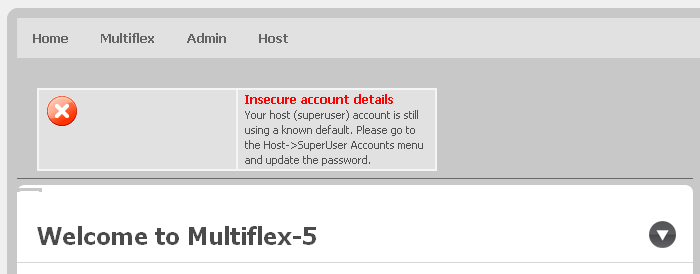
As all of we know that when there is a warning or error in loading a module for admin, while logged in as admin/host we see dnn's warning/error message. While implementing skins, we generally don't care about it as it will be only visible to admins/hosts. Have you wondered if we can fix that somehow? here is a sample screen show while Multiflex Skin is showing a dnn warning message.

dnn warning message
Let's fix it using jQuery:
1. Add jQuery reference and a js file called Home.js
<%DotNetNuke.Framework.jQuery.RequestRegistration()%>
<script src="<%=SKinPath %>Home.js" type="text/javascript"></script>
2. Let's add jQuery to format the message
$(function() {
    if ($('#dnn_ContentPane>table').length > 0) {
        $('#dnn_ContentPane>hr').remove();
        var $table = $('#dnn_ContentPane>table')
        $table.hide();
        var html = '';
        $('td', $table).each(function() {
            html += $(this).html();
        });
        $table.remove();
        $('#dnn_ContentPane').prepend('<div id="divMsg"><div class="content-cell-corner-top"></div><div class="content-cell">' + html + '</div><div class="content-cell-corner-bottom"></div>');
    }
});

And we are done! now let's take a look at how the dnn warning message is looking in Multiflex5 skin?


dnn warning message formatted

So, we can see a little bit of jQuery can format the message at client side. I was thinking how to get it formatted right from the server side and will try to figure this out.

Next fix in multiflex5 is of dnn action menu, Once I will done with that, new version of mutltiflex5 will be released.

Please tell me your thoughts or shared your solutions for the same problem you faced during dnn development to make the Multiflex5 better suited to use in production.

Have fun with the free skin.

Friday, August 13, 2010

Free DNN Skin - Multiflex5

New free skin is available on OSDNNSKINS. An open source template Multiflex5 is converted into DNN Skin. Please visit  download section of OSDNNSKINS site.
Instructions for using the skin:
  • Download and install Skin package and Container package from Download section of OSDNNSKINS 
  • Create sample page and try applying a skin and container to it
  • Use Rounded-Center.ascx as a default container
  • Use Subcontent.ascx as right sidebar container
  • Use botton-subcontent for two column layout of CenterLeftPane and CenterRightPane
Updated

Limitations:
  • DNN Action drop down menu is not showing correctly right now
  • DNN Module warnings are not showing correctly
I've notices the above two things after releasing the skin packages, so will fix this in the next release in next weekend.
Tested in all the popular browsers and looks fine. (IE7, latest version of Firefox, Chrome and safari)
Please send your feedback on this skin.

Update:
Multiflex5 version 0.2 is now available to download which is now stable. Please report bugs you find in issue tracker of OSDNNSKINS

Saturday, July 10, 2010

DotNetNuke: Free Module - Sample SiteMap with Navigation and Filter

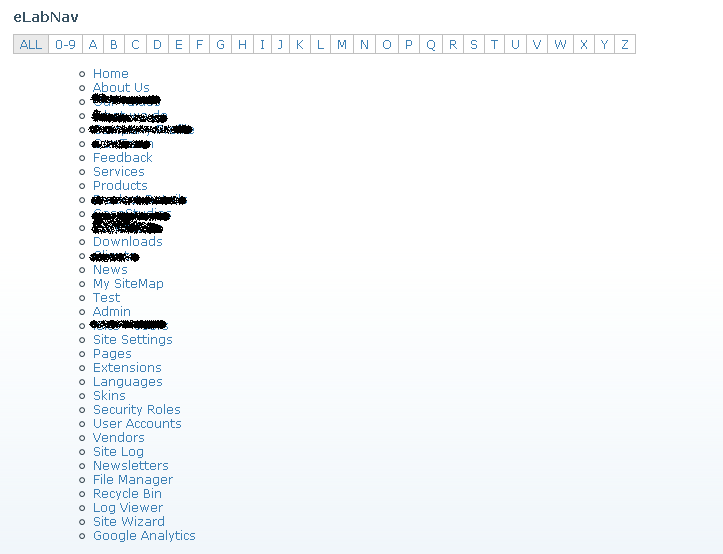
Check out this free dnn module showing site map with option to filter the links using alphabet. Here are some of it's features:
  • Ajax to load tab links for an alphabet
  • Option to see all tab links or specific tab link
  • Only initial version to present the idea
  • It uses jQuery Navigation Pluggin  to show filter links
  • Screenshot:

Further improvements and objectives

The basic idea to would be to create a module that can be used as a dynamic page that shows various links and can be used for SEO purpose.

Send your suggessions

Please send in your wish list of features that you expect and can add value to this. Please feel free to download and evaluate the module and use it in whatever way you want.

Download

DotNetNuke: Common tips for skin Developers

    Skin Development

  1. How to add reference to jQuery?
    Add following server tag at the top of your skin file
    Add following at the end of your skin file:

    <%  DotNetNuke.Framework.jQuery.RequestRegistration()%> 
    
    <script runat="server">
     Protected Sub Page_Init(ByVal sender As Object, ByVal e As EventArgs) Handles Me.Init
      dotnetnuke.Framework.jQuery.RequestRegistration()
     End Sub
    </script>
    
    
    Thanks to Brian Dukes for correcting this
  2. How to access Tab Name?

    <%=  PortalSettings.ActiveTab.TabName%> 
    
    Now that you know how PortalSettigns is having ActiveTab you can play with properties of ActiveTab which is of type TabInfo
  3. How to access currently logged in user?

    <%=  PortalSettings.UserInfo.DisplayName%> 
    
    Once again PortalSettigns, you can use PortalSettings.UserInfo.Roles to provide role based elements to your skin.
  4. how to get path of Skin folder?
    Most useful and easy one

    <%=  SkinPath%> 
    
    so if you want to show an tips.jpg which is images directory in your skin root directory, do this

    <img src="<%=SkinPath %>images/tips.jpg" alt="tips" title="tips" />
    
  5. How to find default portal and admin skins from database?

    selecT* from PortalSettings where SettingName in ('DefaultAdminContainer','DefaultAdminSkin','DefaultPortalContainer','DefaultPortalSkin')
    select * from HostSettings where SettingName in ('DefaultAdminContainer','DefaultAdminSkin','DefaultPortalContainer','DefaultPortalSkin')
    
    DNN will try to look at PortalSettings table and see if admin and default portal skins are available there, if found, it will apply that settings otherwise it will load it from HostSettings table.
    Here is more advanced link from dnn blog.

    Reference and links for skin development

  1. There are lots of skin objects, which are described well here, or you can download entire DotNetNuke Skinning Guide from dotnetnuke website.
  2. Building dnn skins using BluePrint css framework
    Free Sample skin developed using BluePrint css framework
  3. Tutorial on building DNN Skins using YAML
  4. Pros and cons of using css frameworks in dnn

More..

Please drop me a line to get any kind help regarding the dnn skin development and administration problems.

Popular Posts