In this post, I'm going to create a new WCFService with basicHTTPBinding and deploy it to IIS. I will mediate the deployed service with WSO2 ESB 3.0.0. For mediating the service, I will use "Pass Through Proxy".
- Pre-requisites
- Visual Studio 2008 or higher to create WCF Service
- wso2 esb 3.0.0 or higher, get it from here
- Install and Start WSO2 ESB 3.0.0
- Extract the downloaded esb files
- Go to command prompt
- locate to bin directory of extracted esb
- write "wso2server.bat" and that will start the wso2 esb server after a few seconds
- Create a new WCF Service
- Start Visual Studio and go to File > New Project
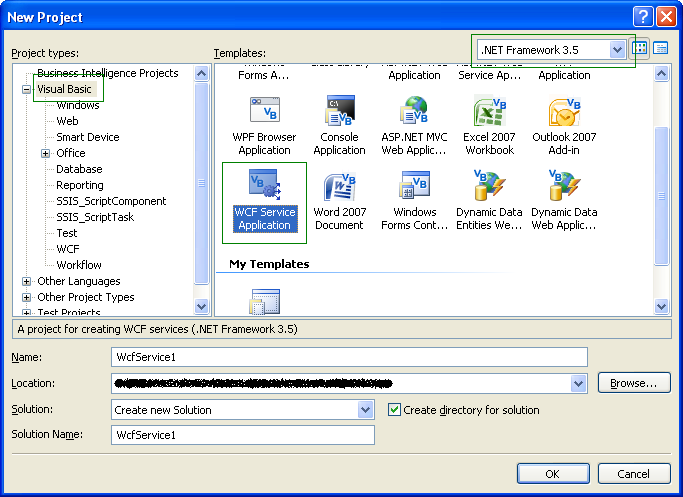 |
| Create a new WCF Service Application from visual studio |
- That will create a new WCF Service
- Open web.config and go to "system.serviceModel" element:
<service name="xxx" behaviorConfiguration="xxxx">

    <!-- Service Endpoints -->
    <endpoint address="" binding="basicHttpBinding" contract="xxxx">
    </endpoint>
    <endpoint address="mex" binding="mexHttpBinding" contract="IMetadataExchange"/>
Make sure you change the endpoint element's binding attribute is having value basicHttpBinding
- Just Right click on the service project and click on Build Project
- It show you "Build Success" in status bar
- Right click on project again and click on publish
- Create a new folder called WCFServiceDeployed and select it as output directory
- Go to IIS and Create a new virual directory called "WCFService" and point it to WCFServiceDeployed folder
- right click on Service1.svc (or whatever svc file you have) and click on browse.
- Copy the wsdl url shown in the service page.
- Create Pass through proxy in wso2 esb
- Make sure you have wso2 esb up and running
- Locate your browser to https://localhost:9443/carbon
- use admin/admin as username/password to login to the site
- Click on Services > Add > Proxy Services
- Click on "Pass Through Service"
- enter "WCFService" in "Proxy Service Name" text box
- In "Target Url" add url of WCF Service
- Expand "Publish WSDL" option
- From the Publish WSDL drop down menu, choose "Specify Source Url"
- In the text box of WSDL URI, enter your published svc url suffixed with ?wsdl
- Expand Transport
- Uncheck HTTPS transport
- Click on create
- Go to Services > List
- Click on WCFService
- Copy the endpoint url
- Creating Client for the newly created service in esb
- Start Visual studio
- Create a new console application project (i'm using visual basic)
- Right click on the project and click on add web reference
- enter the url of the endpoint that you get from web esb
- click on ok
- go to module1.vb
- Add following code:
Dim client As New localhost.WCFService
Dim strData As String = client.GetData(100, True)
Console.WriteLine(strData)

Dim cmpType As New localhost.CompositeType
cmpType.BoolValue = True
cmpType.BoolValueSpecified = True
cmpType.StringValue = "It works"
Dim retCmpType As localhost.CompositeType = client.GetDataUsingDataContract(cmpType)
Console.WriteLine(retCmpType.StringValue)
Console.ReadKey()
That's It, you will see the output in console window. Press any key to exit the console application.
Please note that I'm using web reference because I am not able to correcly implement WCF Client for the service yet. In upcoming post, I will cover how to secure WCF service with basicHTTPBinding with wso2esb


Hi. A try this with the ESB v4.5.0 and I have this problem:
ReplyDeletemessage send by ESB
POST /service/service1.svc HTTP/1.1
Content-Type: application/soap+xml; charset=UTF-8; action="http://tempuri.org/IService1/GetData"
Cookie: menuPanel=visible; menuPanelType=main; region3_registry_menu=visible; region1_manage_menu=visible; region5_my_identity_menu=visible; region1_dashboard_main_menu=visible; wso2.carbon.rememberme=admin-d4356f82-e26a-4932-9e78-1a90199097da; JSESSIONID=D3FD34FC6238E1EAC9538311ACE1A2E3; Modernizr=; current-breadcrumb=manage_menu%2Cservices_menu%2Cservices_list_menu%23; MSG13492919241270.6344102672428753=true; requestedURI="../../carbon/service-mgt/service_info.jsp?serviceName=testNET"; MSG13492936069900.5787983074513814=true
Transfer-Encoding: chunked
Host: 10.55.18.111:8888
Connection: Keep-Alive
User-Agent: Synapse-HttpComponents-NIO
102
56
0
message recieve:
HTTP/1.1 415 Cannot process the message because the content type 'application/soap+xml; charset=UTF-8; action="http://tempuri.org/IService1/GetData"' was not the expected type 'text/xml; charset=utf-8'.
Server: Microsoft-IIS/7.5
X-Powered-By: ASP.NET
Date: Tue, 04 Dec 2012 23:53:54 GMT
Content-Length: 0
any idea why this happen?
You can try by disabling chunking to getover the above problem. Refer http://sanjeewamalalgoda.blogspot.com/2012/08/how-to-disable-chunking-wso2-esb-proxy.html for more info.
Delete- Asanka